
MariaDB is a robust database engine suitable for traditional web and enterprise applications. For example, many e-commerce platforms, ERP systems, and other applications that prioritize speed and flexibility still use MariaDB/MySQL. However, people are now looking for other databases that offer strong data integrity and broad query capabilities. They are choosing PostgreSQL over MariaDB/MySQL. Many organizations stumble on MariaDB/MySQL limits in analytics, advanced data types, and concurrency. That is why more and more teams are switching from MySQL to PostgreSQL, an open-source database with a robust feature set, rigorous standards conformance, and the ability to support transactional and analytical workloads in scale. In this article, we will show you how to migrate a production MariaDB database to PostgreSQL on Ubuntu 26.04
Prerequisites
- An Ubuntu 26.04 server
- SSH root access or a regular system user with sudo privileges
Conventions
# – given commands should be executed with root privileges either directly as a root user or by use of sudo command
$ – given commands should be executed as a regular user
Step 1. Update the System
Log in to your Ubuntu 26.04 VPS via SSH as a root or as a regular user with sudo privileges.
ssh root@IP_Address -p Port_numberIf you cannot log in as root, replace “root” with a user with sudo privileges. Also, change “IP_Address” and “Port_Number” to match your server’s IP address and SSH port.
You can check whether you have the correct Ubuntu version installed on your server with the following command:
# lsb_release -aYou should get this output:
No LSB modules are available.
Distributor ID: Ubuntu
Description:    Ubuntu 26.04
Release:    26.04
Codename:   resolute
That’s it; the system package information should be updated now.
Step 2. Pre-Migration Check
We need more storage space for the MariaDB backup file, the new PostgreSQL database files, plus temporary transaction logs during import. So, make sure you do not have an issue with storage. Run this command to see your disk space.
# df -lhYou will see the used space and the total available space.
Next, we need to generate a backup with single-transaction enabled so live web visitors are not locked out while it dumps.
# mariadb-dump -u app_user -p --single-transaction --routines --triggers newdatabase > database_name_backup.sqlThen, we need to count rows for every key table so we can verify that PostgreSQL has the exact same count to the single digit after migration. We need to go to the MariaDB shell and run the command below.
# mariadbThe command above will bring you to the MariaDB shell; you will see this:
Welcome to the MariaDB monitor.  Commands end with ; or \g.
Your MariaDB connection id is 33
Server version: 11.8.6-MariaDB-5ubuntu0.1 from Ubuntu -- Please help get to 10k stars at https://github.com/MariaDB/Server

Copyright (c) 2000, 2018, Oracle, MariaDB Corporation Ab and others.

Type 'help;' or '\h' for help. Type '\c' to clear the current input statement.

MariaDB [(none)]>
Now, execute this command while we are in the MariaDB shell:
SELECT table_name, table_rows FROM information_schema.tables WHERE table_schema = "newdatabase";Step 3. Install PostgreSQL and pgLoader
We want to migrate our MariaDB database to PostgreSQL. So, PostgreSQL is not installed. There are several methods to migrate a MariaDB database to PostgreSQL. In this article, we will use the pgloader tool. We can install the PostgreSQL server and pgloader now. PGloader is an open-source data pipeline tool designed specifically to connect to MariaDB, read the schema, convert all tables, stream the data, rebuild indexes, and sync sequence counters automatically.
# apt install -y postgresql postgresql-contrib pgloaderAt the time of this writing, the command above will install PostgreSQL 18 and pgloader 3.6. Once installed, the PostgreSQL server should be up and running now.
Step 4. Configure PostgreSQL
In MariaDB, databases sometimes use latin1 or utf8mb4. In PostgreSQL, UTF-8 is the gold standard and natively supports 4-byte characters (emojis, international alphabets, mathematical symbols) with zero configuration headaches. Now, let’s create a new PostgreSQL database and user.
# sudo -u postgres psqlThe command above will bring us to the PostgreSQL shell; we will see this:
psql (18.4 (Ubuntu 18.4-0ubuntu0.26.04.1))
Type "help" for help.

postgres=#
While in the PostgreSQL shell, run these commands:
CREATE USER app_user WITH PASSWORD 'm0d1fyth15';
CREATE DATABASE newdatabase WITH OWNER = app_user ENCODING = 'UTF8';
GRANT ALL PRIVILEGES ON DATABASE newdatabase TO app_user;
Now, let’s connect to the new database and run some commands:
\c newdatabase
GRANT ALL ON SCHEMA public TO app_user;
ALTER DEFAULT PRIVILEGES IN SCHEMA public GRANT ALL ON TABLES TO app_user;
ALTER DEFAULT PRIVILEGES IN SCHEMA public GRANT ALL ON SEQUENCES TO app_user;
\q
That’s it, a new database, database user, and its privileges have been created now.
Step 5. Migrate MariaDB database to PostgreSQL
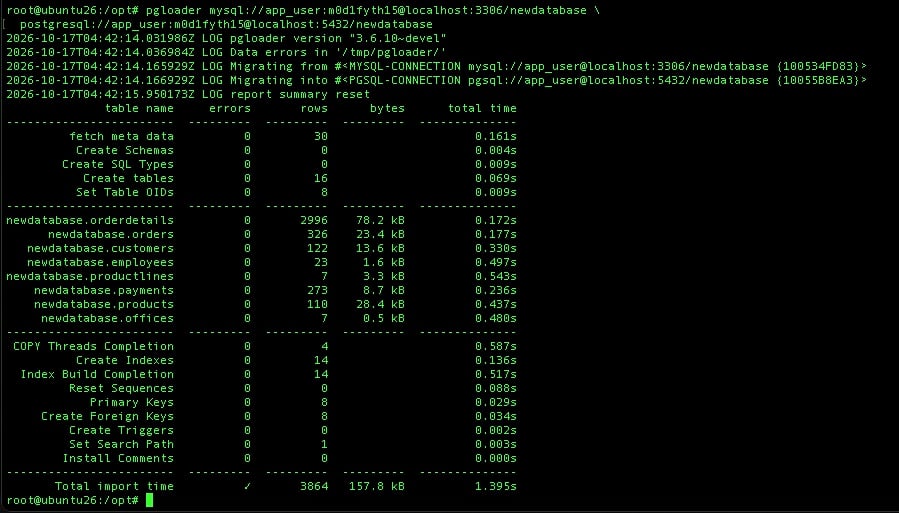
In this step, we will run the pgloader command to import the MariaDB database to PostgreSQL. Let’s execute this command:
pgloader mysql://app_user:m0d1fyth15@localhost:3306/newdatabase \
  postgresql://app_user:m0d1fyth15@localhost:5432/newdatabase
The command will return an output like the one shown in the image below if the command is successful.
Step 6. Verification
Never assume the migration succeeded without proof. Run these commands to verify the table counts:
Check the database in MariaDB:
mariadb -u app_user -pm0d1fyth15 -e "
SELECT table_name, table_rows
FROM information_schema.tables
WHERE table_schema = 'newdatabase';
"
It will show you this output:
+--------------+------------+
| table_name   | table_rows |
+--------------+------------+
| employees    |         23 |
| customers    |        122 |
| productlines |          7 |
| orders       |        326 |
| payments     |        273 |
| orderdetails |       2996 |
| offices      |          7 |
| products     |        110 |
+--------------+------------+
Check the database in PostgreSQL:
PGPASSWORD='m0d1fyth15' psql -h localhost -p 5432 -U app_user -d newdatabase -c "
SELECT relname AS table_name, n_live_tup AS estimated_rows
FROM pg_stat_user_tables
ORDER BY n_live_tup DESC;
"
The command will print this output:
  table_name  | estimated_rows
--------------+----------------
 orderdetails |           2996
 orders       |            326
 payments     |            273
 customers    |            122
 products     |            110
 employees    |             23
 productlines |              7
 offices      |              7
(8 rows)
Compare the result and make sure everything matches.
Next, we can run the sanity check. Execute the command below:
PGPASSWORD='m0d1fyth15' psql -h localhost -p 5432 -U app_user -d newdatabase -c "
DO \$\$
DECLARE
    r RECORD;
BEGIN
    FOR r IN (SELECT table_name, column_name, sequence_name
              FROM information_schema.columns
              JOIN information_schema.sequences ON column_default LIKE '%' || sequence_name || '%'
              WHERE table_schema = 'public') LOOP
        EXECUTE format('SELECT setval(''%s'', COALESCE((SELECT MAX(%I) FROM %I), 1))',
                       r.sequence_name, r.column_name, r.table_name);
    END LOOP;
END \$\$;
"
If everything is okay, the command above will only print “DO”
Conclusion
That’s it! You have followed this article and successfully migrated your MariaDB database to PostgreSQL.
Of course, you don’t have to migrate a production MariaDB database to PostgreSQL on Ubuntu 26.04 on your own. If you have an active monthly server management service with us, or grab our per-incident server support, you can ask our Linux admins to migrate everything for you. Our experienced administrators are available 24×7 and will handle your request immediately.
If you liked this post on how to migrate a production MariaDB database to PostgreSQL on Ubuntu 26.04, please share it with your friends or leave a comment below.
